We know that Microsoft don't recommend any kind of load testing against SharePoint Online pages as mentioned here but still customers want to know how much time it takes to load a page to get a feel of the end user experience.
Solution:
To find the page load times, browsers (Edge, Chrome & Firefox) now have built-in support of Navigation Timing which is a JavaScript API to measure the performance of a web page. This API is exposed via performance.timing object. Performance Timing API provides following events of for a web page, which we can use in JavaScript to get the different times of page load:

Here is an example of JavaScript that calculates the complete page load time, starting from the user pressing the Go button in the browser till the page renders completely:
Load Time: <div id="LoadTime"> </div>

<script type="text/javascript" >

window.onload = function(){
  setTimeout(function(){
    var t = performance.timing;
    document.getElementById('LoadTime').innerHTML = t.loadEventEnd - t.navigationStart;
  }, 0);
}

</script>
Note that above script is calculating difference between loadEvendEnd (very last event) and navigationStart (very first event) which is simulating the end user experience. The time will be displayed in milliseconds.
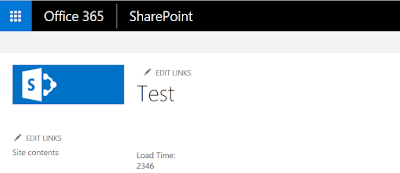
Similarly we can calculate the time between the request sent to server and response that came back from the server by calculating the difference between responseEnd and requestStart events.

Similarly we can calculate the time between the request sent to server and response that came back from the server by calculating the difference between responseEnd and requestStart events.


SharePoint Online page performance can be evaluated from the end-user perspective by using the browser’s JavaScript Performance Timing API. The approach described here focuses on measuring the time from navigation start through the completion of page loading, rather than performing load testing against SharePoint Online.
ReplyDeleteThe performance.timing object provides useful browser timing events that can be compared to understand different stages of page loading. For developers working with browser-based applications, Javascript Online Course can help build a stronger foundation for working with JavaScript APIs and performance-related scripting.
The example using window.onload calculates the difference between loadEventEnd and navigationStart, giving the complete page load duration in milliseconds. Similar timing measurements can be useful when analyzing how applications behave from the user's perspective, while Javascript Online Training can provide further practice with JavaScript development concepts.
ReplyDeleteThe same timing information can also be used to examine the period between a request being sent to the server and the response being received. Comparing requestStart and responseEnd provides a way to examine that portion of the page-loading process, which can be particularly relevant when working with applications that communicate with backend services through RESTful API Training concepts.
ReplyDeletegreat
ReplyDelete