MySites is created when user accesses the MySite Host Site.

After the profiles are marked deleted in the UserProfile_Full table, Cleanup job takes care of the dirty work.




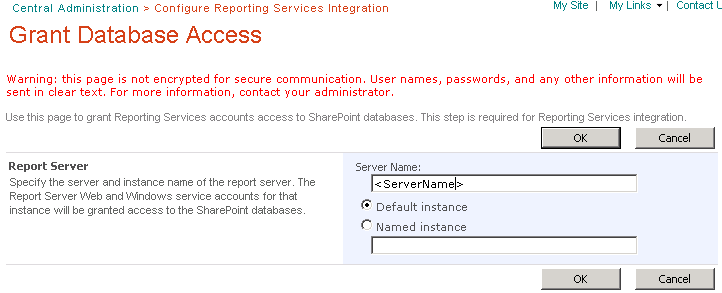


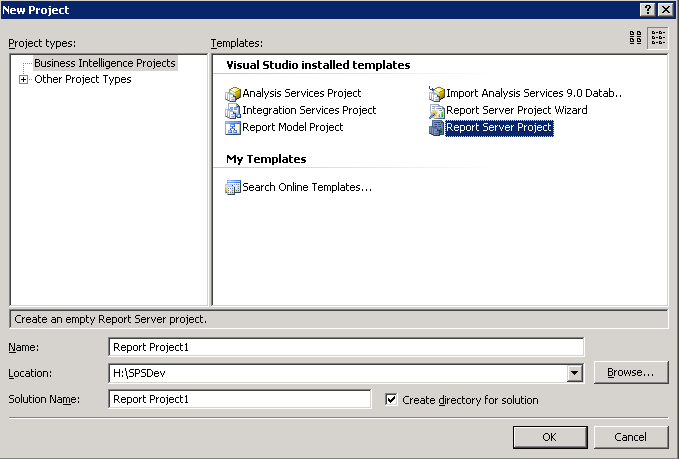


<Query>
  <SoapAction>http://schemas.microsoft.com/sharepoint/soap/GetListItems</SoapAction>
  <Method Namespace="http://schemas.microsoft.com/sharepoint/soap/" Name="GetListItems">
      <Parameters>
         <Parameter Name="listName">
            <DefaultValue>List9</DefaultValue>
         </Parameter>
         <Parameter Name="viewName">
            <DefaultValue></DefaultValue>
            <ViewFields>
               <FieldRef Name="Title" />
               <FieldRef Name="Choice" />
            </ViewFields>
         </Parameter>
      </Parameters>
   </Method>
   <ElementPath IgnoreNamespaces="True">*</ElementPath>
</Query>


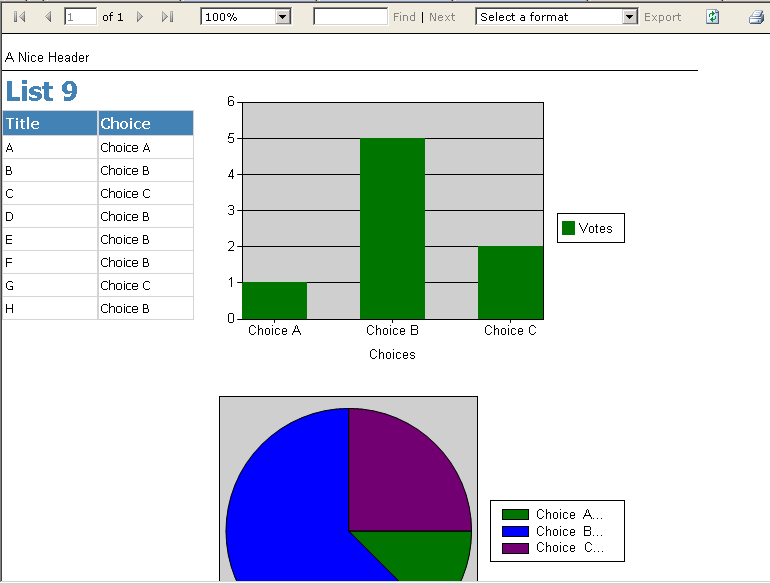
# Export Sharepoint User Profiles to CSV file
# Created: John Lynch 2013
# Updated: Tahir Naveed 2014
# MIT License

$siteUrl = "http://MySite.com"
$outputFile = "G:\UPAExport\UPAexport_20140428.csv"

Add-PSSnapin Microsoft.SharePoint.PowerShell -ErrorAction SilentlyContinue

Function GetDisplayName($UserName)
{
    $serviceContext = Get-SPServiceContext -Site $siteUrl
    $upm = New-Object Microsoft.Office.Server.UserProfiles.UserProfileManager($serviceContext);
    $userProfile = $upm.GetUserProfile($UserName);
    $FullName = $userProfile.DisplayName
    return $FullName
}

$serviceContext = Get-SPServiceContext -Site $siteUrl
$profileManager = New-Object Microsoft.Office.Server.UserProfiles.UserProfileManager($serviceContext);
$profiles = $profileManager.GetEnumerator()

$fields = @(
            "UserName"
            "FirstName",
            "LastName",
            "PreferredName",
            "WorkPhone",
            "MobilePhoneFromAD",
            "HomePhone",
            "CellPhone",
            "Fax",
            "localTelephone",
            "SPS-Birthday",
            "WorkEmail",
            "PersonalSpace",
            "PictureURL",
            "Office",
            "title",
            "department",
            "manager",
            "SPS-School",
            "PersonalInterests",
            "LocationExperience",
            "HomeTown",
            "Assistant"
)

$collection = @()

foreach ($profile in $profiles)
{
   $user = "" | select $fields
   foreach ($field in $fields)
   {
        if($profile[$field].Property.IsMultivalued)
        {
            $user.$field = $profile[$field] -join "|"
        }
        else
        {
            if ($field -eq "manager" -or $field -eq "Assistant")
            {
                $DomainName = $profile[$field].Value;
                if ($DomainName -ne $null)
                {
                    $DisplayName = GetDisplayName $DomainName
                    $user.$field = $DisplayName
                }
            }
            else
            {
                $user.$field = $profile[$field].Value
            }
        }

   }
   $collection += $user
   Write-Host $user.UserName
}

$collection | Export-Csv $outputFile -NoTypeInformation -Encoding UTF8
$collection |  Out-GridView
Starting 2014 with @Harvard's famous @CS50. #CS50x
— Tahir Naveed (@NooriNath) January 9, 2014
using Microsoft.IdentityModel.Claims;

protected override void CreateChildControls()
{
try
  {
      this.Controls.Add(new LiteralControl(GetClaimInfo()));
  }
  catch (System.Exception exp)
  {
       this.Controls.Add(new LiteralControl(exp.Message));
  }
}

public string GetClaimInfo()
{
    String strClaim = null;
    IClaimsPrincipal icp = Page.User as IClaimsPrincipal;

    // Access IClaimsIdentity which contains claims
    IClaimsIdentity claimsIdentity = (IClaimsIdentity)icp.Identity;


    // Access claims
    foreach (Claim claim in claimsIdentity.Claims)
    {
     strClaim = claim.Issuer + " - " + claim.ClaimType + " - " + claim.Value + "<br/>" + strClaim;
    }
    return strClaim;
}public string GetClaimInfo()
{
String strClaim = null;
string strGroup = null;
IClaimsPrincipal icp = Page.User as IClaimsPrincipal;
// Access IClaimsIdentity which contains claims
IClaimsIdentity claimsIdentity = (IClaimsIdentity)icp.Identity;
// Access claims
foreach (Claim claim in claimsIdentity.Claims)
{
if (claim.ClaimType.EndsWith("groupsid"))
{
strGroup = new System.Security.Principal.SecurityIdentifier(claim.Value).Translate(typeof(System.Security.Principal.NTAccount)).ToString();
strClaim = claim.Value + " - " + strGroup + "<br/> " + strClaim;
}
}
return strClaim;
}
function GetListSize($List)
{
    [long]$listSize = 0
    $allAttachmentsFolder = $List.RootFolder.SubFolders["Attachments"]

    foreach ($listItem in $List.Items)
    {
        $listItemAttachments = $listItem.Attachments
        $attachmentsFolder = $allAttachmentsFolder.SubFolders[$listItem.ID]
        foreach($file in $listItemAttachments)
        {
            $listSize += $attachmentsFolder.Files[$file].Length
        }
    }

    $totalInMb = ($listSize/1024)/1024
    $totalInMb = "{0:N2}" -f $totalInMb

    return $totalInMb
}


