We all come across situation at times when we have to display data from two different lists in a single view, specially in reporting. I was looking if SharePoint Designer support something like Join View etc when I came across Sahil Malik's following amazing article:
URL: http://blah.winsmarts.com/2007-10-Performing_joins_between_SharePoint_lists.aspx?postID=359
Showing posts with label DataView. Show all posts
Showing posts with label DataView. Show all posts
Monday, July 6, 2009

Thursday, May 21, 2009
Date Comparison in XSL
Since XSL in SharePoint Designer does not have a very good support for date comparisons. I Googled for at least more than half of the day for a decent date comparison and came across this post as a solution by ma man Kotendra. However, this post assumes that date is provided in ISO format (YYYMMDD). This was not my case…so I Googled bit more and bit more and little bit more :o) and here is the solution.
Below is the formula (XSLT Filtering) to compare dates in SharePoint Designer using XSL:
[
number(ddwrt:FormatDateTime(ddwrt:FormatDate(string(@Open_x0020_Date),1033,1),1033,'yyyyMMdd'))
>=
number(ddwrt:FormatDateTime(ddwrt:FormatDate(string($varFromDate),1033,1),1033,'yyyyMMdd'))
]
Above formula will convert date 5/31/2009 into 20093105 and treat it as a number to compare with another number converted from date.
Thanks!
Below is the formula (XSLT Filtering) to compare dates in SharePoint Designer using XSL:
[
number(ddwrt:FormatDateTime(ddwrt:FormatDate(string(@Open_x0020_Date),1033,1),1033,'yyyyMMdd'))
>=
number(ddwrt:FormatDateTime(ddwrt:FormatDate(string($varFromDate),1033,1),1033,'yyyyMMdd'))
]
Above formula will convert date 5/31/2009 into 20093105 and treat it as a number to compare with another number converted from date.
Thanks!
Monday, May 11, 2009
Implementing Search in a SharePoint List
There are times when we want to search in a SharePoint list only, not in the whole portal. I ran into this requirement in my current project and implemented the search on a list using SharePoint Designer. I didn’t want to create a WebPart and with some research I was able to do it in SharePoint Designer. In this post I will explain what exactly I did.
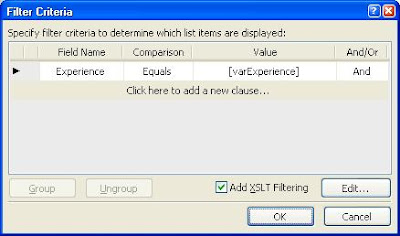
 6. Again, open the Common Data View Task window and choose Filter this time.
7. Select Add XSLT Filtering and hit Edit… button. Don’t get confuse with the varExperience. It’s just another variable and has absolutely nothing to do with our example.
 <xsl:variable name="Rows" select="/dsQueryResponse/Rows/Row[contains(@Tech_x0020_Skill_x0020__x0023_1,$varTechnicalSkill)]"/>
To implement the search I created following two pages:
1. Search.aspx (This page will take input parameters)
2. SearchResults.aspx (This page will display results in DataView Control and filter the data based on the input parameters provided in the Search.aspx)
2. SearchResults.aspx (This page will display results in DataView Control and filter the data based on the input parameters provided in the Search.aspx)
Let’s start the implementation:
1. I will not go into the details of Search.aspx page. All you can have on the Search.aspx page is a text box and a submit button. Clicking the button will redirect the use to SearchResults.aspx with the parameters attached into the Query String. Our final URL will look like:
Yup, I am searching for people in my list who have SharePoint skills.
2. Open the SearchResults.aspx in SharePoint Designer and insert the DataView Control. I applied Master Page so those pages don’t look like an alien :o).
3. Assign the DataSource of the list and at this point DataView should display all the items in the list.
4. In the designer, select <WebPartPages:DataFormWebPart>and open the Common Data View Task window and choose Parameters.
2. Open the SearchResults.aspx in SharePoint Designer and insert the DataView Control. I applied Master Page so those pages don’t look like an alien :o).
3. Assign the DataSource of the list and at this point DataView should display all the items in the list.
4. In the designer, select <WebPartPages:DataFormWebPart>
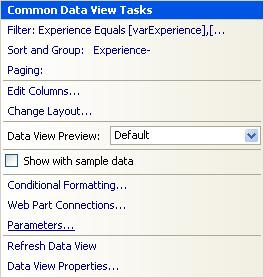
5. Create a Parameter varTechnicalSkill and Select Query String from Parameter Source drop down and provide the Query String Variable which is skill in our case.
6. Again, open the Common Data View Task window and choose Filter this time.7. Select Add XSLT Filtering and hit Edit… button. Don’t get confuse with the varExperience. It’s just another variable and has absolutely nothing to do with our example.
8. In the Advance Condition window, in Edit the XPath expression provide the following formula for search:
 [contains(@Skill,$varTechnicalSkill)]
Contains is a XSL function
@Skill is the column in the list
$varTechnicalSkill is the parameter which will get populated by the Query String skill.
Hit OK and then OK again.
9. If you view the source then you should be able to see the following XSL code added to the <XSL:tamplate>:
<xsl:variable name="Rows" select="/dsQueryResponse/Rows/Row[contains(@Tech_x0020_Skill_x0020__x0023_1,$varTechnicalSkill)]"/> 10. Save the SearchResults.aspx page and that’s it. We are good to use the search functionality.
Subscribe to:
Posts (Atom)