Showing posts with label Silverlight. Show all posts
Showing posts with label Silverlight. Show all posts
Wednesday, May 25, 2011

Monday, January 24, 2011
Silverlight Application in SharePoint 2010
In my last post I have explained how to develop the Silverlight application using Visual Studio 2010. Then we deployed that application in SharePoint 2007 using Content Editor Webpart. In this post I will explain how to deploy the same application in SharePoint 2010 using Silverlight Webpart.
Note: Please click here for the Silverlight application development using Visual Studio 2010. This Hello World Silverlight application can be deployed on both SharePoint 2007 and 2010.
Deployment to SharePoint 2010
Pretty easy hah! =]
Note: Please click here for the Silverlight application development using Visual Studio 2010. This Hello World Silverlight application can be deployed on both SharePoint 2007 and 2010.
Deployment to SharePoint 2010
- Go to the SharePoint portal.
- Upload the SilverlightApp.xap to a document library.
- Create a sample webpart page.
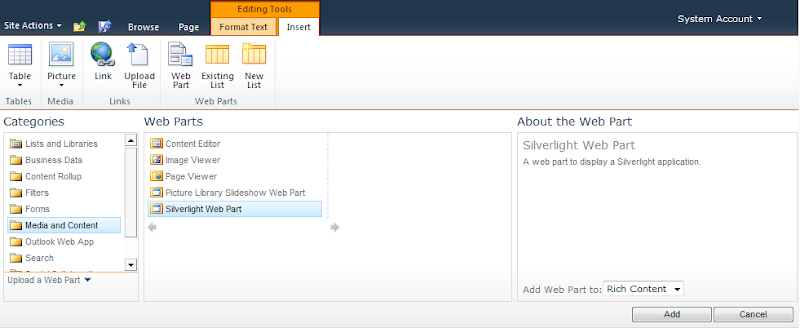
- Open the page in Edit mode and from the ribbon select Editing Tools -> Insert -> Web Part.
- From categories select Media and Content -> Silverlight Web Part -> Add.
- Provide the URL of the SilverlightApp.xap file and hit OK.
- It should look like this


Pretty easy hah! =]
Wednesday, January 19, 2011
Silverlight Application for SharePoint 2007
The goal of this post is to guide the .NET developers to write a basic Silverlight 3 application using Visual Studio 2010 and then deploying it to SharePoint 2007. Trust me its pretty easy :).
Development with Visual Studio 2010
Following are the steps to develop a simple Silverlight 3 application using Visual Studio 2010:
- Launch Visual Studio 2010
- Select File -> New -> Project -> Silverlight Application and hit Ok.
- Uncheck Host the Silverlight Application in a new Web site and select OK. We don’t want to host our Silverlight application in a ASP.NET Web application rather we will host it in a simple HTML page. This HTML Page will get created by the project.
- Now you are ready to do the development on MainPage.xaml.
- Drop a Textbox(txtMessage) and a Button(btnGo) on MainPage.xaml from the Toolbox on the left.
- Double click on the button to get it’s click event handler and paste following code there:
- Go to bin folder and you will see a HTML file (In my case its SilverlightAppTestPage.html). Launch that HTML file and it should display your Silverlight application. Clicking the Go button should display the text entered in the Textbox.


namespace SilverlightApp
{
public partial class MainPage : UserControl
{
    public MainPage()
    {
        InitializeComponent();
    }
    private void btnGo_Click(object sender, RoutedEventArgs e)
    {
        MessageBox.Show(this.txtMessage.Text);
    }
}
}

Note: When Silverlight application is compiled, Visual Studio generates a XAP file (compiled silverlight application) which runs in a silverlight enabled browser. HTML page contains the object tag to load the Silverlight control which runs the Silverlight application.
Deployment to SharePoint 2010
Following are the steps to deploy the Silverlight application in to a SharePoint 2007 site:
- Goto a SharePoint portal.
- Upload the Silverlight.xap file in a document library.
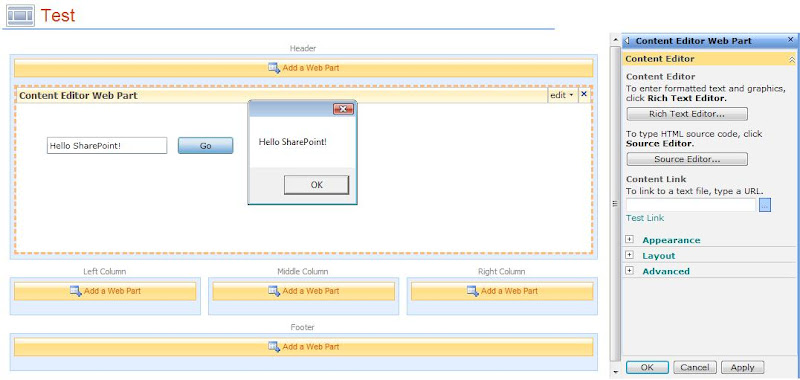
- Create a test ASPX page and add a Content Editor Web Part on it.
- Paste following HTML object code in the ContentEditor Web Part:
- Make sure to change the parth of the XAP file from the document library.
- Exit the edit mode.
- The Silverlight application should be displayed in the test page.
<object type="application/x-silverlight-2" width="600" height="200">
    <param name="source" value="SilverlightApp.xap"/>
    <param name="minRuntimeVersion" value="3.0.40818.0" />
    <param name="background" value="white" />
</object>
<iframe id="_sl_historyFrame" style="height:0px;width:0px;border:0px"></iframe>
Thanks for reading :).
Subscribe to:
Posts (Atom)
-
 Scenario: Updating the Master Page for SharePoint Online is not recommended by Microsoft now.....fine. So how do we change the UI then? And...
 -
 Microsoft introduced Office Graph a couple of months back which uses machine learning techniques to connect people to the relevant content,...
 -
 Recently my customers was looking for a solution where on-field guys can search for answers related to their tasks and it was a perfect scen...