So I can create mobile apps for Office365 without writing any code using Microsoft Power Apps......This is Awesome.
URL: https://powerapps.microsoft.com/en-us/tutorials/get-started-test-drive/#save-and-share-your-app
Showing posts with label No Code. Show all posts
Showing posts with label No Code. Show all posts
Wednesday, February 10, 2016

Thursday, April 15, 2010
Intractive SharePoint Charts with No Code
Recently I came across this amazing article of Claudio (http://www.endusersharepoint.com/2009/04/20/finally-dynamic-charting-in-wss-no-code-required/) about displaying the graphs from a SharePoint list data without writing any code (of course JavaScript is code but we are referring to C# here ;o)). It shows how you can display pie-chart (Google Charts) with a small JavaScript code added to CEWP which works on your SharePoint Data.
I have extended the same technique (JavaScript) to display the Interactive Google Charts based on the SharePoint Data without writing any code :o). The javascript code uses JQuery and Google Interactive Charts (aka Visualization API).
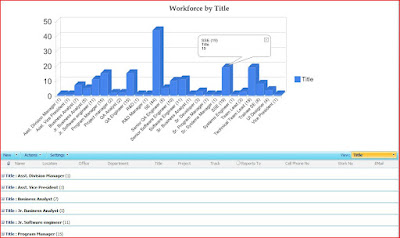
You need to perform following steps:
1. Create a new SharePoint List View.
2. Group the data by a Column e.g. Title.
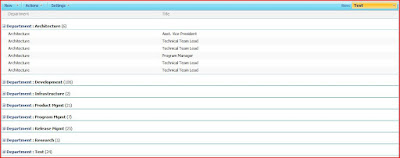
3. Add Content Editor WebPart
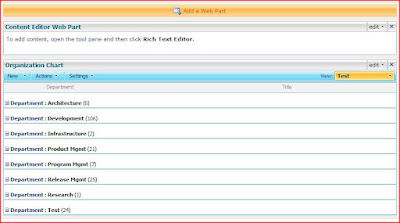
4. Select Edit-> Modify Shared WebPart -> Source Editor and paste the following JavaScript:
5. You will see the error message: Internet Explorer cannot display the WebPage. Ignore the message and remove the ?PageView=Shared from URL and refresh the page. You should be able to see the chart as follows:
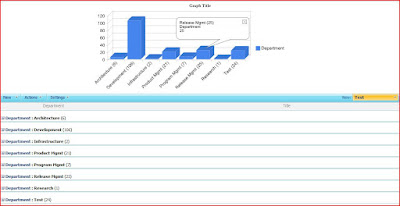
I have extended the same technique (JavaScript) to display the Interactive Google Charts based on the SharePoint Data without writing any code :o). The javascript code uses JQuery and Google Interactive Charts (aka Visualization API).
You need to perform following steps:
1. Create a new SharePoint List View.
2. Group the data by a Column e.g. Title.
3. Add Content Editor WebPart
4. Select Edit-> Modify Shared WebPart -> Source Editor and paste the following JavaScript:
<!--
Author: Tahir Naveed
Date: 2010-04-15
Article URL:http://mysplist.blogspot.com/2010/04/intractive-sharepoint-charts-with-no.html
Blog URL: http://mysplist.blogspot.com/
Original Code: http://www.endusersharepoint.com/2009/04/29/finally-dynamic-charting-in-wss-no-code-required-part-3-multiple-pie-charts
-->
<SCRIPT type=text/javascript>
if(typeof jQuery=="undefined")
{
    var jQPath="http://ajax.googleapis.com/ajax/libs/jquery/1.3.2/";
    document.write("<script src='",jQPath,"jquery.js' type='text/javascript'><\/script>");
}
</SCRIPT>

<script type="text/javascript" src="http://www.google.com/jsapi">
</script>

<SCRIPT type=text/javascript>
var ColValue = new Array();
var ColName = new Array();

// Getting the Data
$("document").ready(function(){
 var arrayList=$("td.ms-gb:contains(':')");
 var coord= new Array();
 var labels= new Array();
 $.each(arrayList, function(i,e)
 {
  var MyIf= $(e).text();
  var txt= MyIf.substring(MyIf.indexOf('(')+1,MyIf.length-1);
  // Extract the 'Y' coordinates
  coord[i]=txt;
  var txt1= MyIf.substring(MyIf.indexOf(':')+2,MyIf.indexOf("(")-1);
  // Extract the labels
  labels[i]=txt1+"("+txt+")";
  //add also coordinates for better read
 });
 ColValue = coord;
 ColName = labels;
 });

//Graph Rendering
google.load("visualization", "1", {packages:["columnchart"]});
google.setOnLoadCallback(drawChart);
function drawChart()
{
  var data = new google.visualization.DataTable();
  data.addColumn('string', 'Department');
  data.addColumn('number', 'Department');
  data.addRows(ColValue.length);
  for (i=0; i<ColValue.length; i++)
  {
   data.setValue(i, 0, ColName[i]);
   data.setValue(i, 1, parseInt(ColValue[i]));
  }
  var chart = new google.visualization.ColumnChart(document.getElementById('chart_div'));
  chart.draw(data, {width: 600, height: 240, is3D: true, title: 'Graph Title'});
}
</script>

<div id="chart_div" align="center"></div>
5. You will see the error message: Internet Explorer cannot display the WebPage. Ignore the message and remove the ?PageView=Shared from URL and refresh the page. You should be able to see the chart as follows:
Subscribe to:
Posts (Atom)
-
 Scenario: Updating the Master Page for SharePoint Online is not recommended by Microsoft now.....fine. So how do we change the UI then? And...
 -
 Microsoft introduced Office Graph a couple of months back which uses machine learning techniques to connect people to the relevant content,...
 -
 Recently my customers was looking for a solution where on-field guys can search for answers related to their tasks and it was a perfect scen...