Wednesday, May 25, 2011

Friday, May 6, 2011
Replacing URL in HTML using JQuery
Scenario:
Sometimes if a list is currupted, Allitems.aspx's HTML starts acting weird and we dont want to spend too much time to dig deep into the problem but want a quick fix and endup fixing the HTML. Same goes here.
Solution:
Following code change the URLs in a page to a predefined URL.
Sometimes if a list is currupted, Allitems.aspx's HTML starts acting weird and we dont want to spend too much time to dig deep into the problem but want a quick fix and endup fixing the HTML. Same goes here.
Solution:
Following code change the URLs in a page to a predefined URL.
<script type="text/javascript">

 if(typeof jQuery=="undefined")
 {
  var jQsrc="http://ajax.microsoft.com/ajax/jquery/jquery-1.4.4.min.js";
  document.write(unescape("%3Cscript src='"+jQsrc+"' type='text/javascript'%3E%3C/script%3E"));
 }
</script>

<script type="text/javascript">

$(document).ready(function() {
  //find all hyperlinks in the table holding calendar links and
  //change them to point at the display page instead of the edit page
  $("table[id^='CalViewTable']").find("a[href*='OldForm.aspx']").each(function(){
  var originalUrl = $(this).attr("href");
  var newUrl = originalUrl.replace("OldForm.aspx", "NewForm.aspx");
$(this).attr("href", newUrl);
});
});

</script>
Monday, March 28, 2011
Monday, March 21, 2011
ECMAScript Class Library
Following is the refrence to SHarePoint 2010 ECMA Script Class Library:
URL: http://msdn.microsoft.com/en-us/library/ee538253.aspx
URL: http://msdn.microsoft.com/en-us/library/ee538253.aspx
Tuesday, March 15, 2011
SharePoint Client Object Model vs Server Object Model Classes
One of the new feature of SharePoint 2010 is the Client Object Model. By using Client Object Model, developers can build the applications which can talk to SharePoint without using WebServices and without deploying any server side code.
Following is the list of Client Object Model classes and their equivalent to Server Object Model classes:
Example:
Ref: http://msdn.microsoft.com/en-us/library/ee857094(office.14).aspx
Following is the list of Client Object Model classes and their equivalent to Server Object Model classes:
| Client Object Model | Server Object Model |
| ClientContext | SPContext |
| Site | SPSite |
| Web | SPWeb |
| List | SPList |
| ListItem | SPListItem |
| Field | SPField |
Example:
using Microsoft.SharePoint.Client;

private void SomeMethod()
{
  ClientContext clientContext = new ClientContext(siteUrl);
  Site siteCollection = clientContext.Site;
  Web site = clientContext.Web;
}
Ref: http://msdn.microsoft.com/en-us/library/ee857094(office.14).aspx
Friday, March 4, 2011
EMail as Primary Key in List
Problem:
I have been asked a question today from one of the developers in another team that he wants to create a user registration list where emial should be unique for every user. And if user add item with existing email then he should be informed.
Solution:
We know that this functionality does not exist in the OTB SharePoint list features. After googling a bit I found following excellent solution using JQuery:
URL: http://sharepointjavascript.wordpress.com/2009/11/23/sharepoint-lists-or-document-librarys-primary-key-in-selected-field/
I have been asked a question today from one of the developers in another team that he wants to create a user registration list where emial should be unique for every user. And if user add item with existing email then he should be informed.
Solution:
We know that this functionality does not exist in the OTB SharePoint list features. After googling a bit I found following excellent solution using JQuery:
URL: http://sharepointjavascript.wordpress.com/2009/11/23/sharepoint-lists-or-document-librarys-primary-key-in-selected-field/
Monday, January 24, 2011
Silverlight Application in SharePoint 2010
In my last post I have explained how to develop the Silverlight application using Visual Studio 2010. Then we deployed that application in SharePoint 2007 using Content Editor Webpart. In this post I will explain how to deploy the same application in SharePoint 2010 using Silverlight Webpart.
Note: Please click here for the Silverlight application development using Visual Studio 2010. This Hello World Silverlight application can be deployed on both SharePoint 2007 and 2010.
Deployment to SharePoint 2010
Pretty easy hah! =]
Note: Please click here for the Silverlight application development using Visual Studio 2010. This Hello World Silverlight application can be deployed on both SharePoint 2007 and 2010.
Deployment to SharePoint 2010
- Go to the SharePoint portal.
- Upload the SilverlightApp.xap to a document library.
- Create a sample webpart page.
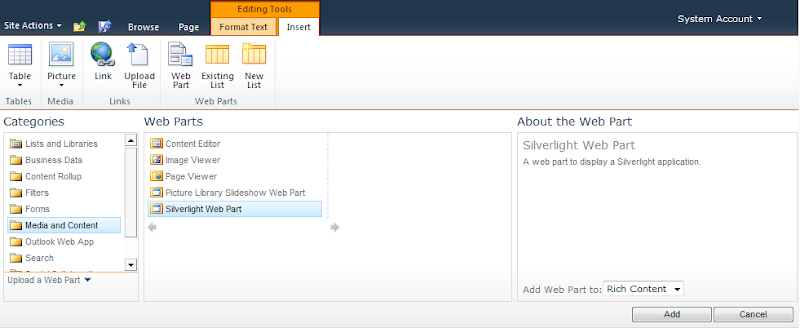
- Open the page in Edit mode and from the ribbon select Editing Tools -> Insert -> Web Part.
- From categories select Media and Content -> Silverlight Web Part -> Add.
- Provide the URL of the SilverlightApp.xap file and hit OK.
- It should look like this


Pretty easy hah! =]
Subscribe to:
Posts (Atom)
-
 Scenario: Updating the Master Page for SharePoint Online is not recommended by Microsoft now.....fine. So how do we change the UI then? And...
 -
 Microsoft introduced Office Graph a couple of months back which uses machine learning techniques to connect people to the relevant content,...
 -
 Recently my customers was looking for a solution where on-field guys can search for answers related to their tasks and it was a perfect scen...